Extending image-dired
Emacs' image-dired is a companion package to dired that makes it easier to browse images and to do some very basic image editing. It is a perfect example of how Emacs can be extended to accomplish tasks that go beyond text manipulation.
I will not go through the details of how to use it, but I will illustrate a couple of things I recently added to it in my configuration.
I typically use image-dired to manipulate pictures that accompany blog posts and other stuff I publish on my personal website. These pictures are often exported from Google Photos, and when that is the case their size is usually not suitable for web.
So, I want to be able to know their resolution and, when it is too high, to quickly resize them.
More details in the header line
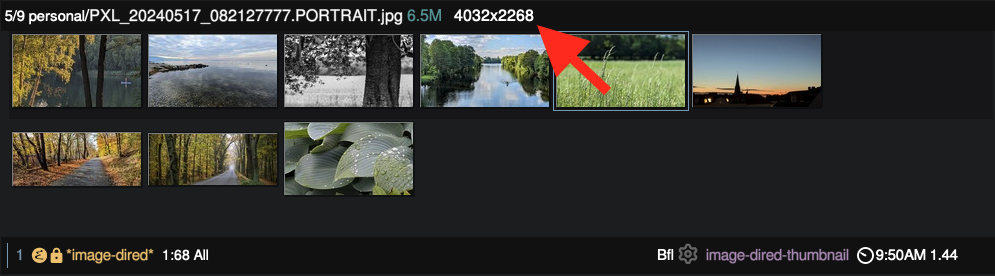
Let's tackle the first problem first. The image-dired header line only displays the name and the size of the the image file.
Unfortunately, image-dired does not provide a direct way to customize the header line format, so I have to recur to advicing.
The general idea of function advicing is to change the behavior of an
existing function without altering its original code. More
specifically, it allows to provide a new function that is called
:before or :after each call to the original function, or even to
replace the original function into a new one that can intercept the
function call and completely control what is returned (this function
composition method is called :around). Refer to the manual for further
options and instructions.
In general, I tend to avoid functions advicing because it creates an invisible layer of indirection between the function definition and its behaviour; in other words, it makes it impossible to know the real result of a function call by just looking at the code of its implementation.
Anyway, here my code:
(defun my/image-size (file)
  (with-temp-buffer
    (call-process "identify" nil t nil "-format" "%wx%h" file )
    (buffer-string)))

(defun my/image-dired-enrich-properties (orig-fun buf file image-count props comment)
  (let ((orig-str (apply orig-fun (list buf file image-count props comment)))
        (size (my/image-size file)))
    (concat orig-str " " size)))

(advice-add 'image-dired-format-properties-string :around #'my/image-dired-enrich-properties)
The original function is image-dired-format-properties-string. I
encapsulated a call to the external tool identify (part of
ImageMagick) into my/image-size, which I then call to add that
particular bit of information to the header line string. In what is a
typical :around composition pattern, my advice function calls the
original function, then adds extra information to the original input.
Here an example of the results:
Interactively resizing images
The mechanism here is even simpler. We just need to provide a function that can resize an image (again, using an utility courtesy of ImageMagick), and wrap it in a interactive function we can call when we are in the image-dired buffer.
(defun my/resize-image (file size)
  "Resize the image in FILE to the specified SIZE (interpreted as a percentage). "
  (call-process "magick" nil t nil file "-resize" (format "%d%%" size) file))

(defun image-dired-thumbnail-resize-image ()
  "Resize the image at point. The size is specified at the prompt as a percentage of the original size."
  (interactive nil image-dired-thumbnail-mode)
  (if (not (image-dired-image-at-point-p))
      (message "No thumbnail at point")
    (let* ((file (image-dired-original-file-name))
           (defdir default-directory))
      (with-temp-buffer
        (setq default-directory defdir)
        (if (eq 0 (my/resize-image file (read-number "New size (%): " 50)))
            (message "Successfully resized image")
          (error "Could not resize image: %s"
                 (string-replace "\n" "" (buffer-string))))))))
If we want, we can even map this function to a keystroke, manipulating its specific keymap.
(keymap-set image-dired-thumbnail-mode-map "Z" 'image-dired-thumbnail-resize-image)